

Appearance
Similar Name Warnings
Secure Clinic automatically checks whether a patient shares their name with anyone else on your system, so your team can confirm they are looking at the right record before adding notes, booking appointments, or recording medication.
Where the warning appears
When you open a patient whose name is the same as — or very close to — another patient's, a warning icon appears next to their name in the patient identifier banner at the top of the page.
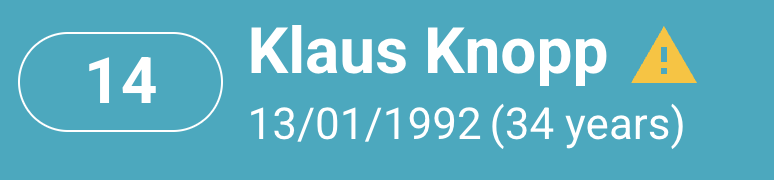
If no similarly-named patient is on file, no icon is shown.
Reviewing the similar patients
Click the warning icon to open the Similar Patient Names window. It lists every patient whose name closely matches the one you are viewing, together with their date of birth and patient ID.
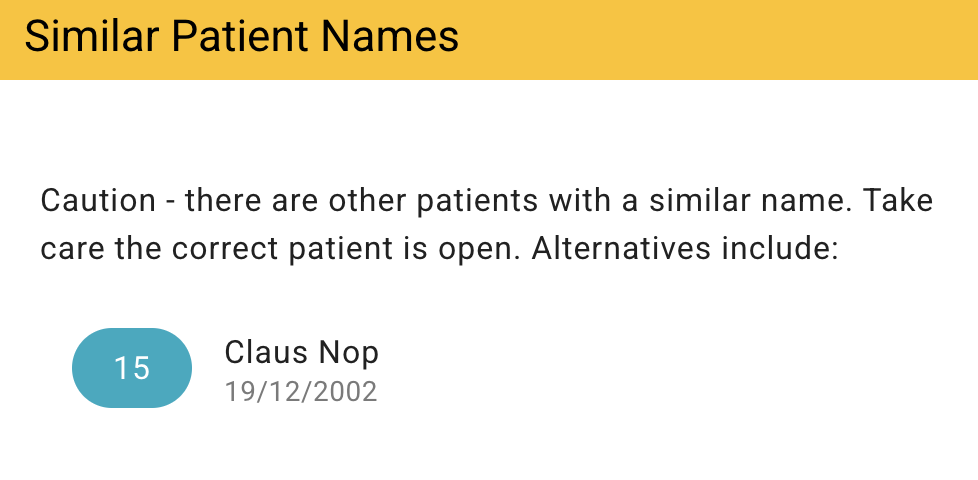
Use the date of birth and ID to confirm you have the right person. Click any patient in the list to go straight to their record — helpful when two records have accidentally been created for the same person and need to be reconciled.
How matches are found
A patient is flagged as similar when their name:
- is spelled exactly the same — for example two patients both called John Smith; or
- differs by only a character or two — for example Ann and Anne, or MacPherson and McPherson; or
- sounds the same even when spelled differently — for example Smith and Smyth, or Catherine and Katherine.
The check compares first and last names only. It deliberately ignores date of birth, so two genuinely different people who share a name are still flagged — that way your team can consciously tell them apart rather than assume they are the same record.
When the check runs
- New patients are checked as soon as they are created.
- Edited patients are re-checked whenever a name changes, so corrections keep the warnings accurate.
- Patients already on your system are included as well, so the warnings cover your whole patient list — not just newly added people.
The check runs automatically. There is nothing to switch on or configure.